

Security & governance
Every request passes the same layers.
People, programs, AI assistants and scheduled work all reach your data through one identity layer, one project access evaluator and one SQL execution gate. Results are masked on the way out, and every layer leaves an audit trail.
- 1access evaluator
- 8gate stages
- 6functional permissions
Projects are the access boundary.
One evaluator decides every access, for the UI, the REST API, MCP and scheduled work alike. A restricted project does not exist for anyone who is neither a member nor an Admin: it answers 404. Pick a caller and a project to see which actions light up.
- ReadResources, SQL, metadata, stored results, documentationgranted
- RunExecute saved SQL, evaluate data contractsgranted
- QueryAd-hoc and draft SQL, LLM work (playground, AI actors)granted
- WriteCreate and change resourcesgranted
- ManageDelete, archive, take over a lock, force a metadata refreshas recorded owner
- ManageMembersManage members, link data sourcesnot granted
- CurateReview learned patterns, documentation and relationshipsnot granted
A restricted project: the Editor member acts with their membership role. Manage applies to what they own (a lock they hold, a subscription or contract they own).
ManageMembers and Curate come only from a ProjectAdmin membership or the Admin role. They are never granted by an open project, to an API key, to an MCP caller or to the owner of scheduled work. An API key reaches only the projects it names, capped by the lower of its scope and its owner's global role, and never gets the Admin bypass.
Administrative duties without administrative data.
The Admin role's duties are split into six permissions. Each is held through a functional role (a level-0 system role an Admin assigns) or an identity-provider app role mapped at sign-in. None of them grants project data, and API keys never hold one.
Approver
Approves and rejects query changes and governed changes (migration jobs, Custom SQL rules, recipient destinations), never their own. Reads every project's approval requests.
Auditor
Reads and verifies the security audit trail; reads the MCP audit, the MCP and project settings, the admin settings (secrets masked), every user's API keys and what a user owns, created or changed last.
SecurityAdmin
Changes the MCP settings and the admin settings except the LLM connection and base URL, manages recipients, publishes saved queries as MCP tools, sets repository tokens.
UserAdmin
Manages external users, their roles and sessions, sees what a user owns, created or changed last, revokes API keys, changes the owner of scheduled work, manages project members, restricts projects.
DataSourceAdmin
Creates, tests and deletes data sources, links a source no open project holds into a project it administers, changes shared data-source state.
MigrationOperator
Runs data migration for the jobs whose data sources it may query and write. Mapped only while migrations are enabled.
Separation of duties
With SeparationOfDuties:Enabled (off by default), giving one user both permissions of a pair is refused with 400, also when an Admin assigns them. A user who already holds both holds neither.
One gate in front of every database.
Every statement Beacon runs on a data source for a user or an AI feature passes the same eight stages: MCP tools, previews, scheduled checks, saved-query tools, data-quality rules, AI features and migration reads. Choose a statement to see where it stops.
SELECT order_id, total
FROM shop.orders
WHERE status = 'paid'
LIMIT 5000000;
Passes every stage. The row cap replaces the statement's own LIMIT, then the statement runs in a READ ONLY transaction.
DELETE FROM shop.orders
WHERE status = 'test';
Refused at stage 4, Guardrail: a write. Nothing reaches the database.
SELECT account_id, balance
FROM finance.public.ledger;
Refused at stage 6, Cross-database rule (cross_database): the name is qualified with finance, not shop.
- 1Deployment lockBeacon:Mcp:ForceReadOnly (on by default) forces read-only whatever the caller asked.
- 2LengthSQL longer than the ceiling (100,000 characters by default) is refused.
- 3CharactersControl characters other than tab, LF and CR, and Unicode non-characters, are refused.
- 4GuardrailWrite and DDL patterns are refused, judged after the dialect's tokenizer strips comments.
- 5AST validatorParsed in the data source's dialect; anything but a read is refused. An unknown dialect is refused.
- 6Cross-database ruleOther databases, remote servers, files, USE, SET ROLE, EXECUTE AS and SQL built from strings are refused.
- 7Host policyFor a host-exposed DbContext: only allow-listed tables and columns.
- 8Row capThe cap is written into the SQL, overriding any bound the statement sets itself.
Then the engine's own read-only path
The gate is the primary control and database-level read-only is defence in depth, so every data source needs a read-only login, on every engine. Every statement has a timeout: 120 seconds by default for scheduled runs, previews and Beacon's own reads, and a fixed 30 seconds for the MCP query and ask tools.
Three calls, traced to the refusal.
An API key never does more than its owner may do now. Each trace below follows one request through the layers to the point where Beacon refuses it, and the answer the caller receives.
Input An MCP client is configured with a key that carries only the Read scope and names the project Shop analytics.
- IdentityThe header starts with Bearer sk-sem_. The key is hashed with SHA-256 and found: not revoked, not expired, owner enabled.
- ClaimsScopes: Read. Projects: Shop analytics (12). Owner: Ana Horvat, Editor.
- Execute-scope policyMapBeaconMcp() mounts /beacon/mcp behind the Execute scope, because its tools run SQL. No session opens.
POST /beacon/mcp
HTTP/1.1 403 Forbidden

# On a host that maps the route with a weaker policy,
# the MCP layer still refuses, and audits the tool call:
Permission denied: this credential does not have
the Execute scope
Input A CI job runs a subscription with an Execute key. Last week its owner, Ana Horvat, was moved from Editor to Viewer.
- IdentityThe key is valid and its owner is still enabled.
- Scope follows the ownerExecute is checked against the owner's current roles on every request. A Viewer has no write permission, so the key acts as a Read key; a warning naming the key id is logged once per process.
- Scope checkEvery /beacon/api request other than GET, HEAD or OPTIONS needs Execute.
POST /beacon/api/subscriptions/31/execute
Authorization: Bearer sk-sem_Xq7…

HTTP/1.1 403 Forbidden
This operation requires the Execute scope.
Input An Editor's Execute key calls the query tool in project 12, a restricted project where the owner is only a Viewer member.
- Identity and scopeValid key, Execute scope, owner holds the Editor role globally. The MCP session opens.
- Project listProject 12 is in the key's list, and the owner is still a member of it.
- Project access evaluatorIn project 12 the owner is a Viewer: Read and Run. The query tool needs Query.
- AuditThe refusal is written to the MCP audit log, and the failed query call records its signal.
tools/call  query  { "project_id": 12, … }

Access denied: you may read project 12 but not run
ad-hoc queries in it.

# Saved-query tools stay available: they need Run.
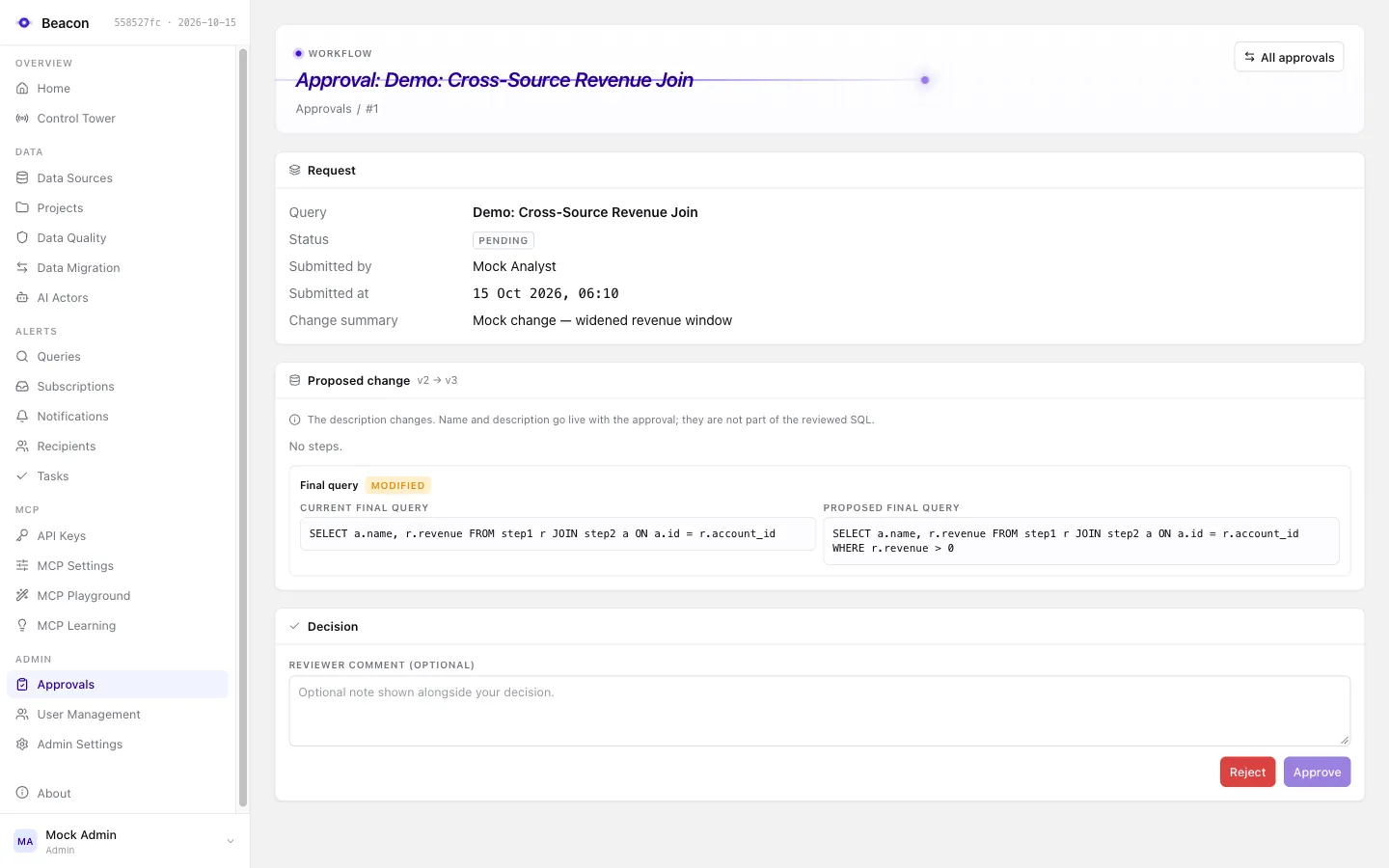
SQL goes live only after a second person reviews it.
With the approval workflow enabled (it is opt-in), a change to what SQL runs or where data goes takes effect only when someone other than the requester approves exactly the content they reviewed.
- Save a changeFiles a PendingApproval version with its exact content and SHA-256 hash. The live query is untouched.
- Review the diffAn Approver other than the requester sees each step's SQL, data source and parameters side by side.
- Approve the hashThe decision carries expectedContentHash: the hash of the content the reviewer was shown.
- Re-checkStill pending, not stale, content unchanged, and every step passes the save checks again.
- Go liveDecision and version move commit in one transaction. Scheduled runs execute only reviewed content.
- Query
- Paid orders without shipment
- Submitted by
- Ana Horvat
- Proposed change
- v4 → v5
  SELECT order_id, customer_id, total, paid_at
  FROM shop.orders
  WHERE status = 'paid'
-   AND paid_at < now() - interval '24 hours';
+   AND paid_at < now() - interval '12 hours';
{ "comment": "Window checked against the fulfilment SLA.", "expectedContentHash": "9c41d27a0be35f86c1e2d4a7b09f3e6d5a28c71f40be96d3a1572e8c4f0de07b"}The approval applies only if
- the request is still pending; a second decision answers 409 and never overwrites the first;
- no other version went live since the change was made; otherwise it is stale and must be submitted again;
- the proposal still holds the submitted content, and that content is what the reviewer was shown;
- every step passes the save checks again: the execution gate and the data source's metadata.
| Kind | Reviewed | Until approved |
|---|---|---|
| Migration job | New job, or a changed source, steps, destination, mode or transformation | Every run is refused and recorded as failed. |
| Custom SQL rule | New rule, or changed SQL or data source | The rule is left out of every evaluation. |
| Recipient destination | New recipient, or changed type, destination or headers | Deliveries skip the recipient; each skip is logged. |
| Scheduled run | The query's active version | Recorded as Skipped and shown as Not approved. |
Guarantees that do not depend on an Admin.
Some settings are pinned by host configuration and bind Admins too. While a lock is on, the settings page shows the setting disabled and the API answers 409 (/errors/setting-locked). Only host configuration lifts it.
Beacon:Mcp:ForceReadOnly = trueRead-only SQL everywhere the gate runs.Locked onBeacon:Mcp:ForcePiiDetection = truePII detection and masking on.Locked onBeacon:Migrations:Enabled = falseThe only write path. Off: no migration endpoints, no jobs, for anyone.Locked offBeacon:Mcp:ForceNoContentRetention = falseSet to true: no question, SQL or error text stored with MCP audit rows.Opt-in lockBeacon:Mcp:ForbidRowDataToLlm = falseSet to true: no row values (samples, value grounding, eval judging) reach the LLM provider.Opt-in lockBeacon:Mcp:Audit:RequireContent = falseSet to true: MCP audit rows keep the question and the SQL of every statement a call ran; nobody can switch retention off.Opt-in lockBeacon:Mcp:Ceilings:MaxRowLimit = noneSet a number: the upper bound for every project's MCP row limit.Opt-in lockValues shown are the defaults. The first three are pinned out of the box; the others pin their setting once the host sets them. Stored values a lock overrides are kept, have no effect, and are listed in one startup warning. Every MCP setting change is recorded in the settings history with who changed it.
Every layer leaves a record.
Beacon keeps three audit records in its own database: an append-only, signed security audit trail, the MCP audit log and the settings history. It also writes a copy of every committed trail event, and security-relevant log events with identifiers only, to the log stream: ship them to your SIEM and alert on them.
Security audit trail
One append-only event per security-relevant action: sign-ins, users and roles, API keys, project access, data sources, delivery, settings, approvals, ownership, curation, data quality, migrations and every read of audit data. Each event is signed and verified on a schedule and before a purge. Auditors read and verify it on the Security Audit page.
MCP audit log
One row per tool call, refusals and failures included: tool, caller, project, data source, rows, timing, trace id, MCP session id, and every statement the call ran (its SQL where content is retained). Optional fail-closed mode withholds a result whose row could not be written. Auditors read it.
Settings history
Admin settings, MCP settings and migration write-target changes, with the old and new value (secrets as ***) and who made the change.
Log stream
Security log events 7101 to 7123 and the Beacon.Audit events, ids only, no personal data. Alert at least on 7119, 7113, 7114, 7115 and 7116, and on audit write or verification failures (9107, 9108).
- 08:59:419100McpToolAuditedTool=query ProjectId=12 Rows=48 DurationMs=212
- 09:02:137108AccessRefuseda 403: ids, reason, principal kind
- 09:05:207101MemberAddedproject and user ids only
- 09:05:209104SecurityAuditRecordedAction=access.member_added, committed and signed
- 09:11:027113UserRolesChangedsessions of the user endalert
- 09:14:377115MigrationWritesChangedwrite-target flag changedalert
- 09:20:057111ScheduledWorkSkippedowner not authorized
- 09:31:447119BreakGlassSignInlogged as a warningalert
- 09:40:107123RowDataSentToLlmCategories=sample-values
- 09:46:589103McpAuditReadrecorded first as audit.mcp_audit_read
- 10:15:029109SecurityAuditCheckpointhourly verification: Checked=212 Failed=0