

Queries
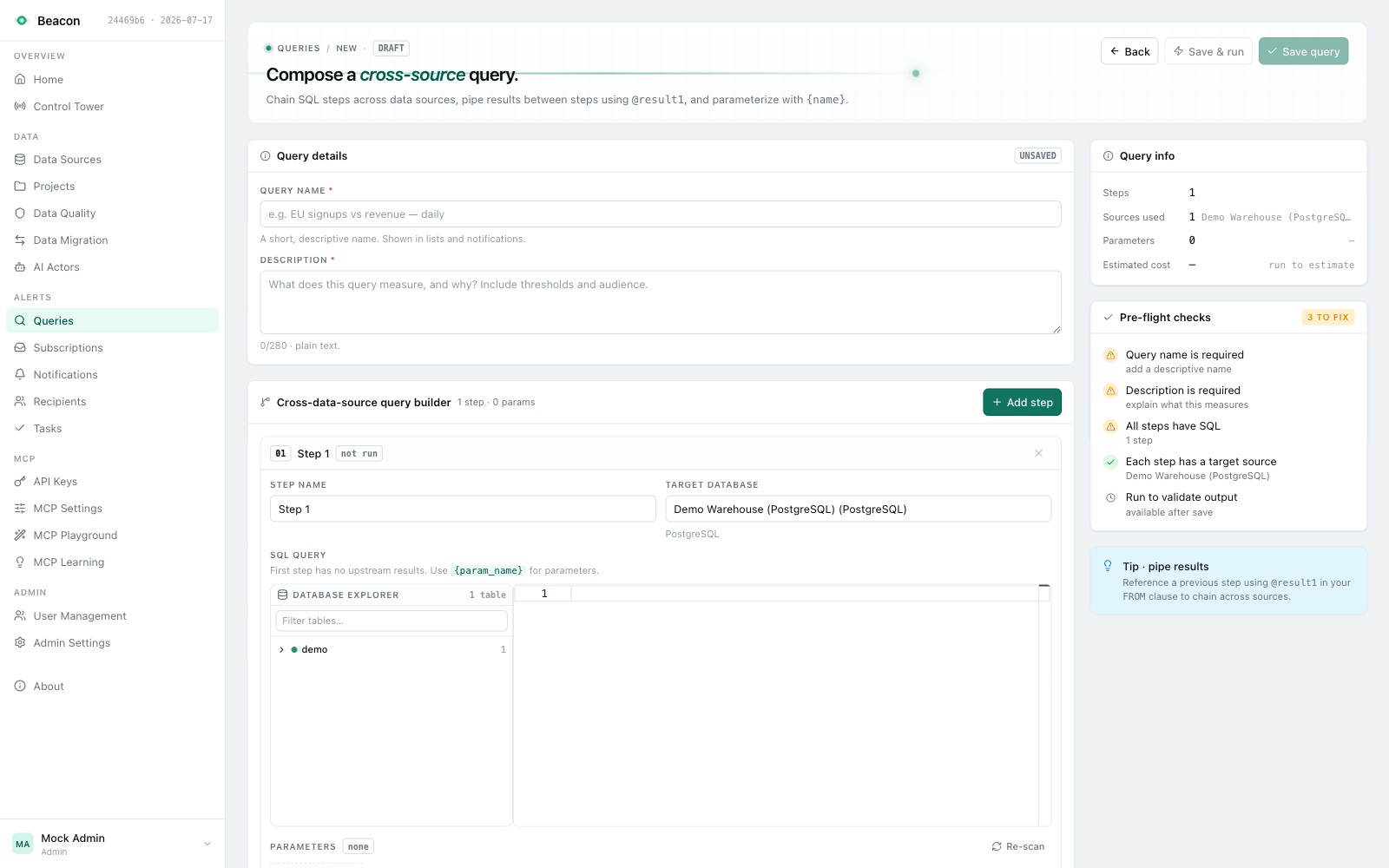
A query is saved SQL that Beacon runs for you. It has one or more steps, each a single read-only SELECT against
one data source, and optionally a final query that joins the steps’ results in memory. Subscriptions schedule
queries, saved-query MCP tools expose them, and AI actors write them.
Typical uses:
- Data validation: return the rows that break a rule (NULLs in required columns, orphaned rows, duplicates, impossible states); a subscription alerts when rows come back.
- Operational health: row counts, backlog sizes, last-load times, database statistics.
- Scheduled reporting: a result delivered to people on a schedule.
Create a query
Section titled “Create a query”- Open Queries (
/beacon/queries) and click New query. - Under Query details, enter a Query name and a Description (both required; the name is shown in lists and notifications).
- In the Cross-data-source query builder, fill in the first step: a Step name, the Target database (the data source the step runs on) and the SQL query. Click Add step for more steps.
- Click Save query, or Save & run to save and run it at once.
Creating a query needs no project; saving its steps needs Write on the query and on every data source the steps read. The query is then reached through the projects that hold all of its data sources (see Project access).
With the approval workflow on, the steps you save are submitted for review and the new query runs nothing until a second person approves them.
-- Orders marked completed but not paid: any row is a problem.SELECT id, status, payment_statusFROM ordersWHERE status = 'completed' AND payment_status <> 'paid'Query parameters
Section titled “Query parameters”Write a parameter as its name in single braces: {start_date}. The editor detects every {name} in a step’s SQL and
lists it as a parameter of that step (default type String); you can set each parameter’s type (Number, DateTime,
String), description and placeholder text, or add one by hand. A subscription supplies a value for each parameter, and
checks when it is saved that the value reads as the parameter’s type.
Beacon never pastes the value into the SQL. It replaces the placeholder with a bound database parameter (@p0, @p1,
…) and sends the value separately, as text. So:
- Do not quote the placeholder.
'{start_date}'becomes the string literal'@p0', not the value. Write{start_date}. - A value is data, not SQL.
CURRENT_DATE - INTERVAL '7 days'as a value is the literal text, never evaluated. Put relative dates in the SQL itself, and keep parameters for fixed values. - Cast where the engine needs it. The value arrives as text; cast it when the column’s type requires it.
-- PostgreSQLSELECT COUNT(*) AS large_ordersFROM ordersWHERE amount > CAST({threshold} AS numeric) AND created_at >= CAST({start_date} AS date)Multi-step queries
Section titled “Multi-step queries”Each step runs on its own data source, in order; a query stops at the first step that fails. A query without a final query returns its last step’s result.
A final query joins the steps’ results: Beacon loads each step’s rows into an in-memory SQLite database as the table
@result1, @result2, … (by step order), and runs the final query there. This is how a query compares or joins data
from different databases; Beacon never joins across connectors at the database.
-- Final query over two steps on different databasesSELECT a.customer_id, a.total AS billed, b.total AS paidFROM @result1 aLEFT JOIN @result2 b ON b.customer_id = a.customer_idWHERE b.total IS NULL OR b.total <> a.totalThe query editor shows the final query read-only; set it through the API (finalQuery on
PUT /beacon/api/queries/{id}) or have an AI actor write it. The final query is SQLite SQL and
passes the same execution gate as every step (see How a query runs).
Manage queries
Section titled “Manage queries”The Queries list
Section titled “The Queries list”The list shows Name (with the description), Source (user-defined, or the AI actor that wrote it), Steps, Subscriptions and Created. It is searchable by name and paged on the server (20 rows per page, at most 200), and it holds only the queries you may read. Click a row to open the query.
The query page
Section titled “The query page”The query page (/beacon/queries/{id}) shows the steps, the final query and run statistics, with these actions:
| Action | What it does |
|---|---|
| Execute query | Runs the saved query now and shows the result (⌘+↵). Needs the Run action on the query. |
| Add subscription | Opens the new-subscription dialog for this query. |
| Edit SQL | Opens the editor (/beacon/queries/{id}/edit). |
| Lock / Unlock | Locks the query against other people’s changes. Locking needs Write; while a query is locked, changing, restoring or unlocking it needs Manage, except for the lock holder. |
The tabs below list the query’s Subscriptions, Executions, Versions and Change history. The MCP tool card shows whether the query is exposed as a saved-query MCP tool; a SecurityAdmin (or an Admin) turns it on or off there.
Edit a query
Section titled “Edit a query”The editor changes the Name, Description and the steps: Add step, Move up, Move down, Delete
step, and each step’s name, data source, SQL and parameters. Saving writes a new active version, or, with the
approval workflow on, submits the change for review. The editor sends the version it loaded, so a save made on top of a
version that is no longer active is refused (409); reload and make the change again.
Before a step is stored, its SQL must pass the execution gate, and when Beacon holds metadata for the step’s data source, every column the SQL reads from a known table must exist there (refresh the data source’s metadata after adding a column). The same check applies when an AI actor writes a query.
Versions and change history
Section titled “Versions and change history”Every executable change is a version: Active (live), Archived (replaced), PendingApproval, Rejected or Superseded.
Versions (/beacon/queries/{id}/versions) lists them; a version’s page shows its steps and final query and compares
it with the current version (GET /beacon/api/query-versions/diff?versionIdA=…&versionIdB=…). Restore
(POST /beacon/api/query-versions/{id}/restore) puts back a version that was live (Active or Archived) as a new
version, or submits it for approval while the workflow is on. Change history lists the query’s recorded changes.
Folders
Section titled “Folders”Queries can be filed in folders through the API: GET/POST /beacon/api/query-folders, PUT and DELETE /beacon/api/query-folders/{id} (delete optionally moves the folder’s queries to its parent), and
PUT /beacon/api/queries/{id}/folder to move a query. The Queries list does not show folders.
Deleting
Section titled “Deleting”Queries cannot be deleted, in the UI or the API. Stop a query from running by archiving its subscriptions, and remove an MCP tool by turning it off on the query page. While a query is live, the data sources it reads cannot be deleted.
Who created and changed it
Section titled “Who created and changed it”A query records who created it and who changed it last, and when, taken from the caller, never from the request:
an edit, restoring a version, archiving it, and, with the approval workflow on, the approval that
makes a proposed version live (the reviewer is recorded as the last to change it). Queries created before this was
recorded show neither. An Auditor or a UserAdmin finds the queries a user owns, created or changed last under
Owned resources. The submissions and decisions of the approval workflow are
recorded in the security audit trail (approvals.query_change_*); creating
and editing a query outside the workflow is attributed on the query but not recorded there as an event.
Approval workflow
Section titled “Approval workflow”The approval workflow is off by default. A host turns it on in code (options.EnableApprovalWorkflow(...) in
AddBeaconServices); see Approvals for the switches, the review rules, the Approvals page and
the endpoints. With it on, a change to what a query runs goes live only after a second person approves it.
- What counts as a change. The query’s executable content: its steps (added, removed, reordered), each step’s name, data source, SQL and parameters (name, type, placeholder), and the final query. Every character of the SQL counts, whitespace and line endings included. A change to the query’s name or description alone goes live directly.
- Submitting. Saving files a PendingApproval version holding exactly the submitted content and its content hash
(SHA-256 of the executable content), plus an approval request naming you as the requester. The live query is not
touched. A query has one pending request: your new submission supersedes your own earlier one, and while another
person’s request waits, every submission of the query is refused (
409) until that one is approved, rejected or withdrawn. - New queries have nothing live until their first version is approved.
- Deciding. An Approver (an Admin holds the permission) other than the requester (and other than anyone who
shaped the change, such as the reviewer of an AI actor’s plan) approves on the Approvals page
(
/beacon/approvals). The approval names the content hash the reviewer was shown (expectedContentHash) and applies only on top of the version the change was made on; otherwise it answers409. The requester may withdraw their own request by rejecting it. Hosts with a single approver can allow self-approval (AllowSelfApproval). - Restores and AI actors are submitted like a save. An AI actor’s SQL is validated without running it, and its creator is the requester (see AI Actors).
Runs execute reviewed SQL. With the workflow on, a subscription run (scheduled, a test delivery, or one an AI actor
created) and a saved-query MCP tool execute only the content of the
query’s active version. When the stored steps are not that content, nothing runs: the run is recorded as Skipped with
“Skipped: query change not approved. Save the query to submit its SQL for approval, or restore a version and approve
it.”, the subscription page shows a banner, its Control Tower row reports notApproved, and a test delivery answers
409. Saving the query brings such SQL under review. Interactive runs (Execute query, the editor’s previews) run the
caller’s SQL under the caller’s own permissions and are not compared.
In strict mode (RequireApprovedVersionToRun, recommended for regulated deployments) a run also needs the active
version to carry an approved request for exactly its content, so a version that went live while the workflow was off
does not run until it is approved (restore it to submit it).
IQueryService.AddQueryStep, UpdateQueryStep and DeleteQueryStep change one live step without a version or a review:
they are refused (409) while the workflow is on, and are obsolete; save the query instead.
Database names
Section titled “Database names”A step’s SQL may name objects of its own data source’s database only. Unqualified and schema-qualified names always work; a name qualified with a database must use the one the data source’s connection is configured for, and is refused otherwise, when the query or step is saved, and again before every preview, run and subscription execution:
| Engine | Full name | Must equal |
|---|---|---|
| SQL Server, Azure Synapse | database.schema.table (four-part linked-server names are refused) | Initial Catalog / Database |
| PostgreSQL | database.schema.table | Database / DB (unquoted names fold to lower case) |
| MySQL | database.table | Database / Initial Catalog |
| Snowflake | database.schema.table | db (unquoted names fold to upper case) |
| Databricks | catalog.schema.table | the configured Catalog |
| BigQuery | project.dataset.table (also inside one backtick-quoted name) | the configured ProjectId |
Function and type names follow the same rule. A data source without a configured database accepts no database qualifier, and names resolved only at run time (IDENTIFIER(...), Snowflake TABLE('...')) are refused. The final query of a multi-step query runs on the in-memory step results and is not affected. See Database names in SQL.
How a query runs
Section titled “How a query runs”Every statement Beacon runs for a query (a preview (stored, draft or paged), a subscription run or its test delivery, an AI actor’s check of the query it wrote (with the approval workflow off; with it on that check runs nothing, see AI actors), a data migration’s source read) goes through the same execution gate as the MCP tools, then the data source’s read-only path:
- The execution gate, with read-only enforcement always on: a length cap, a refusal of control characters (other than tab and line breaks) and Unicode noncharacters, the regex guardrail, the read-only parser in the data source’s dialect (one
SELECT, no writes, no locking hints, no side-effecting or cross-connection functions), the database-name rule, the host policy for a host data source, and a row cap written into the SQL itself (LIMIT/TOP). The text judged is the text that runs: placeholders bound as parameters,--line comments removed (as the data source’s dialect reads them) and line breaks flattened, so a comment line never swallows the clause after it. The regex guardrail reads the statement without its comments: a step may start with-- Revenue by monthor explain itself with/* … */, even naming a write it does not make, while MySQL executable comments (/*! … */) and optimizer hints (/*+ … */) stay and are judged; the parser always reads the SQL as written. AnENDthat closes noCASEis refused (the parser would stop reading there), and on SQL Server and Azure Synapse so is an unquoted alias that is a statement keyword, such asSELECT 1 COMMIT: quote it ([COMMIT]) to use it as a name. - The read-only path of the provider: on PostgreSQL and MySQL the statement runs inside a
READ ONLYsession and transaction (on PostgreSQL as a batch of exactly one command, so a second statement is refused), so the database itself refuses a write the parser missed. SQL Server has no such mode: the statement runs inside a transaction that is always rolled back, which undoes such a write but does not refuse it, and a statement that ends that transaction fails the run. Azure Synapse and Snowflake run it plainly; BigQuery and Databricks refuse anything their own dialect’s parser does not read as a singleSELECT, and BigQuery runs only what a dry run reports as aSELECT. On every engine but PostgreSQL and MySQL a read-only login is the database-level boundary, and the data source pages say so; on PostgreSQL and MySQL the engine’s read-only session is defence in depth, and a read-only login is still required (Read-only guarantees per engine). - Limits: one statement may return at most
Beacon:Query:MaxExecutionRowsrows (default 100,000; see Query Execution Row Cap) (the cap is written into the SQL: a statement’s ownLIMIT,TOPorFETCHabove the cap,LIMIT ALLorNULLis lowered to it, and an expression,TOP … PERCENTorWITH TIESis wrapped in a capped derived table (on SQL Server a statement with aWITHclause that cannot be lowered is refused); on SQL Server and Azure Synapse aUNION,EXCEPTorINTERSECTwithout anORDER BYis capped as a derived table too, so its result columns need names (alias them). On PostgreSQL, MySQL, SQL Server, Azure Synapse and Snowflake the read stops one row past the cap; BigQuery and Databricks read the capped statement’s result whole. A larger result fails the run with returned more than N rows (theBeacon:Query:MaxExecutionRowslimit) instead of delivering part of it) and a statement may run forBeacon:Query:StatementTimeoutSeconds(default 120 seconds). Closing a preview or cancelling a request stops the statement.
The final query of a multi-step query runs on the steps’ results in Beacon’s in-memory SQLite store, behind the same gate (without the database-name rule, it reaches no database) and the store’s own read-only engine settings. A final query that runs out of time fails the run, a preview, a subscription, an AI actor’s check and a migration all see a failure, never an empty result.
Troubleshooting
Section titled “Troubleshooting”“Step N returned more than N rows (the Beacon:Query:MaxExecutionRows limit)”. A larger result fails instead of
being cut short, so a subscription never reports a partial count. Filter or aggregate the step, or raise the setting as
far as the host’s memory allows (a migration’s read names its own limit, Beacon:Migrations:MaxRows). A paged preview
reads one page and a count when the SQL’s shape allows it; SQL it cannot page is read whole and previewed only up to the
limit.
Timeout. A statement may run for Beacon:Query:StatementTimeoutSeconds (default 120 seconds). Check the execution
plan, add indexes, or narrow the step.
“Column does not exist on a table”. The save check found a column the data source’s stored metadata does not list. Check the name, or refresh the data source’s metadata if the column was added after the last refresh.
“The SQL names an object in another database”. A name is qualified with a database other than the one the step’s
data source is configured for; “has no database configured” means the connection names none. Write the name as
schema.table (MySQL: table), or configure the database on the data source. See Database names.
A parameter does not filter. Check that the placeholder is not quoted ({name}, not '{name}') and cast it when
the column is not text.
“Another change to this query is waiting for review”. Someone else’s change is pending; it must be approved, rejected or withdrawn first. See Approval workflow.
A subscription run shows Skipped: query change not approved. The stored SQL is not the approved active version. Save the query to submit it, or restore a version and have it approved.
Related
Section titled “Related”- Subscriptions: schedule a query and deliver its results
- Approvals: the change-review workflow
- Saved query tools: expose a query to MCP clients
- Data Sources: connections and read-only guarantees