

Knowledge Base & SQL Grounding
Beacon does not pass a bare schema dump to an LLM. Every natural-language question (through the ask tool, the MCP Playground, or the get_query_context tool) is answered against an assembled grounding context: the tables that matter, the join paths that are real, the business terms your organisation actually uses, and query examples a human has verified.
This page describes what goes into that context, where each piece comes from, and how you curate it.
The grounding context
Section titled “The grounding context”For a given question and data source, Beacon assembles the context in blocks. Sections marked (authoritative) are human-verified; everything else is machine-derived and labelled as such.
| Block | Contents | Source |
|---|---|---|
| Relevant Tables (full schema) | M-Schema rendering: column name, type, nullability, description, plus real sample values per column | Schema metadata + sample-value collection |
| Other Tables | Names and primary keys only, so the model knows what else exists without burning the budget | Schema metadata |
| Join Paths (verified) | Foreign keys and human-confirmed relationships | Schema relationships |
| Join Paths (UNVERIFIED) | Relationships pending curator verification, explicitly flagged as needing confirmation: an inferred one with its confidence, one a user added as added, pending curator verification | Relationship discovery, people who may not curate the source |
| Coverage | A note when the table neighbourhood was capped, so the model knows the picture is partial | Context assembly |
| Business Glossary | Top-K matching terms with definitions and their column/metric mapping | Business glossary |
| Verified query examples (authoritative) | Human-verified question → SQL pairs for this data source | Golden examples |
| Learned Patterns (from usage) | Known corrections, column clarifications, join patterns, common queries, business-term mappings, documentation gaps | The learning loop |
Sample values are what make filters land on real data ('shipped' vs 'SHIPPED'). They are row data sent to the LLM provider, so collection is off by default: turn EnableSampleValueCollection on for a project (its override on MCP Settings, /beacon/mcp-settings) or globally. A refresh collects while it is on in the effective settings of every live project that links the data source (each project’s override, else the global value), so a project that turns it on collects even while the global value is off. On a data source several live projects link, any of them switching it off stops the collection and keeps the stored values out of every project’s context (see Guardrails of shared data sources), and the deployment lock Beacon:Mcp:ForbidRowDataToLlm keeps it off everywhere. Documentation generation discovers column values for the same projects only, and logs once per run which data sources it listed no values for because collection is off. PII, secret-like and financial-amount columns are never sampled, and a column with a PII- or credential-shaped value keeps none. See Sample values and What reaches the LLM provider.
Who curates grounding
Section titled “Who curates grounding”What a person approves here ends up in every caller’s prompts, so curating it is a narrower right than writing:
| Grounding | Who curates it |
|---|---|
| A project’s learned patterns (approve, reject, set back to pending), its documentation (editing a section, regenerating it) and documentation patches to a section | Curate in the project: a project admin member of it, or an Admin |
| A data source’s shared grounding: verifying or un-verifying a relationship, deleting a verified one, applying or rejecting a documentation patch to a column or table description | Write where the caller acts and Curate in every live project linking the source, or the DataSourceAdmin permission (with Write where it acts), or an Admin; a source no live project links: a DataSourceAdmin or an Admin |
| Golden examples (promote, edit, deactivate), the grounding recheck and the business glossary | Admins only |
Curate is never granted by an open project, and never to an API key (whatever its scope), an MCP caller (user or system, Read or Execute scope) or the owner of scheduled work, whatever their role. Beacon’s own background jobs run without a caller and no project check applies to them, but none of them curates: the learning job stores new patterns as NeedsEvidence, auto-approves only through the replay gate and proposes documentation patches without applying them. A curation that records who decided (reviewing a learned pattern, promoting or editing a golden case, verifying a relationship) also needs a signed-in Beacon user (403 otherwise). A host that wants only Admins to curate simply adds no project admins; Beacon warns at startup about live projects that learn from feedback while no enabled user is their project admin. The pattern, patch and relationship lists and the project documentation tell each caller per row whether they may curate it (canCurate), decided the same way as the routes (403 otherwise); the UI shows the actions only then, and says who may otherwise. See Authorization → Project roles.
Grounding SQL is checked and stored without comments. Every piece of SQL that grounds generation (gold SQL that is promoted or edited, corrected SQL from feedback, a learned pattern’s example SQL when it is mined, approved or auto-approved) passes the grounding SQL check (IGroundingSqlCheck) before it is stored. The SQL is read in its data source’s dialect, its comments are removed, and the comment-free SQL must pass the read-only gate and the catalog check a saved query step passes (a single read-only statement, tables and columns Beacon’s metadata holds). Nothing runs. The check refuses, with the reason:
- A comment that cannot be removed safely: an executable comment (
/*! … */on MySQL), a comment that is never closed, SQL the dialect’s tokenizer cannot read. Comment characters inside a string literal are text, not a comment, and are kept when the dialect’s tokenizer reads the literal as the database does:'a--b'and'/* … */',$$…$$on PostgreSQL,N'…'on SQL Server,'#1'on MySQL,'a//b'on Snowflake,"a#b"on BigQuery. Where the engine reads a literal differently from the tokenizer, the SQL is refused, as with'a--b'on MySQL, which reads--without a following space differently. Comment characters in a quoted identifier ("a--b"on PostgreSQL) are refused, and so is any comment marker on a data source whose SQL dialect Beacon does not know. - Characters a reviewer cannot see, anywhere in the SQL, a literal or a comment included: format characters (bidirectional overrides and isolates, zero-width characters, the byte order mark), the tag characters U+E0000–U+E007F and variation selectors.
- A data source Beacon holds no tables or columns for: there is nothing to check the SQL against, so it is refused until metadata is extracted (“Extract metadata for this data source first”).
- SQL the read-only gate or the catalog check refuses: anything but one read-only statement, or a column the data source’s metadata does not hold.
A golden case’s question holding characters a reviewer cannot see is refused where it is promoted or edited, and a mined example question holding them is not stored.
Prompts render gold and example SQL without comments too, including SQL stored before this check existed, and questions on one line. A golden case whose SQL cannot be shown that way, or whose SQL or question holds characters a reviewer cannot see, is left out whole; a pattern loses only its example; a glossary term loses only its metric expression. Beacon logs which ids it left out, by kind, once per hour per row. The documentation export (behind knowledge answers, get_documentation and the documentation chunk index) and the prompt that generates documentation show a pattern’s example SQL the same way, or not at all. The golden and pattern lists say which rows a prompt leaves out (goldSqlWithheld, questionWithheld; exampleSqlWithheld, exampleQuestionWithheld), and the MCP Learning page flags them and shows hidden characters escaped.
Rechecking stored grounding
Section titled “Rechecking stored grounding”Grounding stored before these checks existed is not rewritten: it keeps grounding prompts, rendered as above, until an Admin decides about it. GET /beacon/api/eval/grounding/recheck?projectId={id} (Admin by live roles, like the rest of /eval) runs today’s checks over one project’s grounding and changes nothing: the question and gold SQL of each active golden case, and the example question and example SQL of each approved or auto-approved learned pattern that is not superseded. SQL passes the grounding SQL check in its data source’s dialect (each data source and its catalog are read once per recheck); a golden case’s question must not be empty, and no question may hold characters a reviewer cannot see. The answer counts what was checked (goldenCasesChecked, patternsChecked) and lists every row a check refuses (refused, golden cases first): its kind (GoldenCase or LearnedPattern), id, dataSourceId, the stored question and sql, the reasons (questionRefusal, sqlRefusal), a golden case’s promotedByUserId (null when it was promoted before Beacon recorded who promoted it) and a pattern’s patternStatus and contentHash. A project that does not exist answers 404. The recheck logs counts and ids only.
On the MCP Learning page (/beacon/mcp-learning) an Admin’s Grounding recheck tab runs it for a project and lists the refused rows, each with the action the Admin chooses: Deactivate a golden case (PUT /beacon/api/eval/golden/{id} with isActive: false) or set a pattern Back to pending (PUT /beacon/api/mcp/learned-patterns/{id}/status with Pending and the row’s contentHash). Nothing is deactivated or set back automatically.
Startup warnings. After the host starts, Beacon warns (best effort: a database it cannot read is noted, never a failure; counts and project ids only) about grounding that waits for an Admin:
- the active golden cases that record no promoting user (promoted before Beacon recorded who promoted a case), with their projects: they keep grounding SQL generation, so review them on the Golden examples tab, run the recheck, and deactivate the ones nobody stands behind;
- with Beacon user management on and learning on (
EnableLearning, globally and in the project’s effective settings), the live projects with no enabled ProjectAdmin member: only an Admin reviews their learned patterns and documentation patches until a member is made their project admin.
Schema relationships
Section titled “Schema relationships”Join paths are the single biggest source of wrong SQL, so Beacon keeps them as first-class, curatable data rather than inferring them at generation time.
Each registered relationship maps a source column to a target column and carries an origin and a cardinality:
| Origin | Meaning | Verified by default |
|---|---|---|
| Foreign key | Read from the database’s declared constraints | Yes |
| Inferred | Proposed from column-naming heuristics (customer_id → customers.id) with a confidence score | No |
| Manual | Declared by a person in the UI or via the API | Only when its creator curates the source |
Cardinality is one of Unknown, One to one, One to many, Many to many.
Only verified relationships are rendered under Join Paths (verified). Unverified relationships appear in a separate block, pending curator verification, that tells the model to confirm before relying on them. A wrong join path that looks authoritative is worse than no join path at all.
A verified relationship is a join every project linking the data source is told to trust, so only a curator of the source’s shared grounding verifies one or deletes one. A relationship someone else declares (or accepts from discovery) is stored unverified, pending verification by a curator (the create answer says so with isVerified: false). A verified relationship that someone else relabels or gives another cardinality goes back to unverified (the update answer says so the same way). A curator’s own declarations and edits stay verified, and a curator’s edit records the curator as the relationship’s verifier, now. Unverified relationships stay in the prompt, under the unverified block: an inferred one with its confidence, one a user added as added, pending curator verification.
Every change applies to the relationship as it was read. An edit writes the new label and cardinality together with the verification it leaves, in one statement, and only while the relationship still holds the label, cardinality and verification read; a removal is conditional the same way; a verification names the label and cardinality the curator reviewed (reviewedLabel, reviewedCardinality) and is written only while the relationship holds them. Anything that lands in between (a curator verifying while an Editor’s edit or removal is under way, an Editor’s edit while a curator verifies) refuses the later request with 409 (“The relationship changed since you loaded it”), so a relationship is never left verified with content its verifier did not see, and a relationship verified meanwhile is never removed on the strength of a check made while it was unverified. Reload the relationships and try again.
Managing relationships in the UI
Section titled “Managing relationships in the UI”Open a data source and go to Schema relationships (/beacon/data-sources/{id}/relationships):
- Discover previews inferred relationships without saving anything. Review each proposal with its confidence score and Accept the ones that are right.
- Add relationship declares one by hand. It is verified when you curate the data source; otherwise the page says it is pending verification by a curator, and so does an edit that sends a verified relationship back to unverified.
- Existing entries can be verified, un-verified (curators only: for anyone else the action is disabled, with the reason), relabelled or deleted. A verified entry is deleted by curators only; for anyone else the action is disabled, with the reason.
The page opens with a schema health panel: table count, relationship count, how many are still unverified, the number of connected groups, the largest connected group, isolated tables, and detected junction tables. Isolated tables and a high group count are the signal that the model has no way to join its way to those tables.
REST API
Section titled “REST API”The relationship endpoints sit under the standard authenticated BeaconApi policy. They manage grounding metadata that every user’s questions depend on, so they are not an admin-only surface. Creating and relabelling a relationship need Write in every live project linking the data source, deleting one Manage there (a DataSourceAdmin: where it acts); verifying one, and deleting a verified one, need Curate there (403 otherwise). The list returns canCurate per relationship; the create answer (id, isVerified) and the update answer (200, isVerified) say whether the relationship is verified. The verify body is isVerified with, to verify, the reviewedLabel and reviewedCardinality the curator reviewed (400 without them); an edit, a removal or a verification of a relationship that changed since it was read answers 409.
| Method | Endpoint |
|---|---|
GET | /beacon/api/data-sources/{dataSourceId}/relationships (filter by origin, verifiedOnly) |
POST | /beacon/api/data-sources/{dataSourceId}/relationships |
PUT | /beacon/api/data-sources/{dataSourceId}/relationships/{relationshipId} |
POST | /beacon/api/data-sources/{dataSourceId}/relationships/{relationshipId}/verify |
DELETE | /beacon/api/data-sources/{dataSourceId}/relationships/{relationshipId} |
POST | /beacon/api/data-sources/{dataSourceId}/relationships/discover-preview |
GET | /beacon/api/data-sources/{dataSourceId}/schema-health |
Business glossary
Section titled “Business glossary”The glossary teaches Beacon your organisation’s vocabulary: what “active customer”, “churn”, or “net revenue” means in your schema. Terms are project-scoped and optionally narrowed to a single data source.
| Field | Purpose |
|---|---|
Term | The business term as people say it |
Synonyms | Alternative phrasings that should match the same term |
Definition | Plain-language definition shown to the model |
TargetSchema / TargetTable / TargetColumn | Where the term lives in the schema |
MetricExpression | The SQL expression that computes it, when the term is a metric |
IsActive | Retire a term without deleting its history |
When a question is asked, the top matching terms (GlossaryTopK, default 5) are injected into the Business Glossary block. Glossary retrieval is scoped to the caller’s authorised project: two projects sharing a data source never see each other’s definitions.
The glossary is managed through the API only and is gated with the Admin policy; there is no UI page for it.
| Method | Endpoint |
|---|---|
GET | /beacon/api/glossary?projectId={id}&dataSourceId={id}&includeInactive={bool} |
POST | /beacon/api/glossary |
PUT | /beacon/api/glossary/{id} |
DELETE | /beacon/api/glossary/{id} |
Golden examples and the eval harness
Section titled “Golden examples and the eval harness”A golden case is a human-verified question → SQL pair. Golden cases do double duty: they are injected into the grounding context as authoritative examples, and they are the regression suite the eval harness scores generation against.
How cases are created
Section titled “How cases are created”Only an Admin creates or edits a golden case. Feedback never does: rating an ask answer (through the feedback MCP tool, the MCP Playground, or POST /beacon/api/eval/feedback, which is Admins only) records the verdict, the user who recorded it and any checked corrected SQL on the answer’s signal, and nothing else. The verdict is recorded whatever becomes of the corrected SQL: when the project does not retain query content, when the answer did not run on a single data source (a cross-source or knowledge answer: there is no dialect to check the SQL in), or when the grounding SQL check refuses it, only the SQL is dropped, and the answer says so (correctedSqlRecorded: false with correctedSqlNotRecordedReason).
- Golden candidates.
GET /beacon/api/eval/golden/candidates?projectId={id}lists the answers ratedcorrectthat were not promoted yet. Onlyasksignals count, because aqueryordry_runsignal’s “question” is the SQL it ran. The list is sorted newest first, and it is paged (page,pageSize,sort). Each candidate shows the question, the SQL a promotion would start from (the rater’s corrected SQL, else the signal’s own corrected SQL, else its generated SQL) with itssqlHash(the SHA-256 of that SQL, lowercase hex), the note, who asked and who rated it. Only signals of one project and one data source whose content was retained are listed. A project under the content lock keeps no question to promote. - By promotion.
POST /beacon/api/eval/golden/promotetakes the candidate’ssignalId, itssqlHashasreviewedSqlHash, and optionalnotes, and records the promoting user (promotedBy). A promotion applies to what the Admin reviewed: the signal must still be ratedcorrectand still hold the SQL whose hash was sent, or the promotion is refused (409, “The answer changed since it was reviewed”: reload the candidates and review it again). Only an answer to a question becomes a case (400for aqueryordry_runsignal); a missing signal, one without SQL, project or data source, a data source its project does not link, a question holding characters a reviewer cannot see, and SQL the check refuses answer400too, and nothing is created. The promotion claims its signal (promotedAt,promotedEvalCaseId) in the transaction that creates the case, only while the signal still holds the reviewed SQL (compared by the digest stored with the signal’s SQL and written with every change to it, which is exact under any database collation; a signal recorded before Beacon kept the digest gets it first, only while it holds none and the SQL read). A signal is therefore promoted once: promoting it again, or two Admins promoting it at the same moment, answers with the case already promoted from it (alreadyPromoted: true, active or not) and creates nothing; a signal promoted before Beacon recorded promotions answers with the first case promoted from it. - By hand.
PUT /beacon/api/eval/golden/{id}edits the question, the gold SQL, the notes, or deactivates the case, and records the editing user (modifiedBy). A question holding characters a reviewer cannot see, or gold SQL the check refuses, is refused (400) and nothing changes.
Promoting and editing need a signed-in Beacon user (403 otherwise): who did it is recorded. On the MCP Learning page an Admin sees three more tabs: Golden candidates (filtered by project, paged, each candidate in full with Promote; a candidate promoted meanwhile shows its existing case, and one that changed since it was listed says so; reload and review it again), Golden examples (a project’s cases, showing who promoted and who last edited each, or Not recorded for a case created before Beacon recorded it; which cases a prompt leaves out; and Deactivate) and Grounding recheck (see Rechecking stored grounding).
Gold SQL, promoted or edited, and corrected SQL from feedback are stored as the grounding SQL check returns them: without their comments. GET /beacon/api/eval/golden returns promotedByUserId and modifiedByUserId (Users.Id) with promotedByName and modifiedByName (the display name, or “User {id}”); all are empty for a case created before this was recorded. It also returns goldSqlWithheld and questionWithheld: whether a prompt leaves the case out.
Injection
Section titled “Injection”The top GoldenExemplarTopK (default 4) cases matching the question are rendered into Verified query examples (authoritative), ranked above mined learned patterns and capped by GoldenExemplarBudgetChars (default 2000). Retrieval hard-filters on the caller’s project, so golden SQL never leaks across project boundaries on a shared data source. Gold SQL is rendered without its comments and the question on one line; a case whose comments cannot be removed, or whose SQL or question holds characters a reviewer cannot see, is left out, and its id is logged once per hour.
Eval runs
Section titled “Eval runs”POST /beacon/api/eval/runs replays every active golden case for a project through the real generation pipeline and scores the result. Comparison is by result-set fingerprint. The generated SQL does not have to match the gold text; it has to produce the same rows. Each failure is tagged so that a user can distinguish a retrieval failure (the model never saw the right table) from a SQL-reasoning failure from an execution failure.
With EnableEvalJudge turned on, an opt-in LLM judge reviews a capped, PII-redacted sample of the rows to distinguish a cosmetically different result from a wrong one. It is off by default.
Both the gold SQL and the generated SQL are re-validated read-only and run through the query guardrail before execution. The harness inherits nothing and introduces no new execution path.
| Method | Endpoint |
|---|---|
POST | /beacon/api/eval/runs |
GET | /beacon/api/eval/runs?projectId={id}&take={n} |
GET | /beacon/api/eval/runs/{runId}/results |
GET | /beacon/api/eval/golden?projectId={id}&dataSourceId={id} |
GET | /beacon/api/eval/golden/candidates?projectId={id} |
GET | /beacon/api/eval/grounding/recheck?projectId={id} |
PUT | /beacon/api/eval/golden/{id} |
POST | /beacon/api/eval/golden/promote |
POST | /beacon/api/eval/feedback |
The eval group is Admin-gated: it executes SQL against live data sources and writes golden cases.
The learning loop
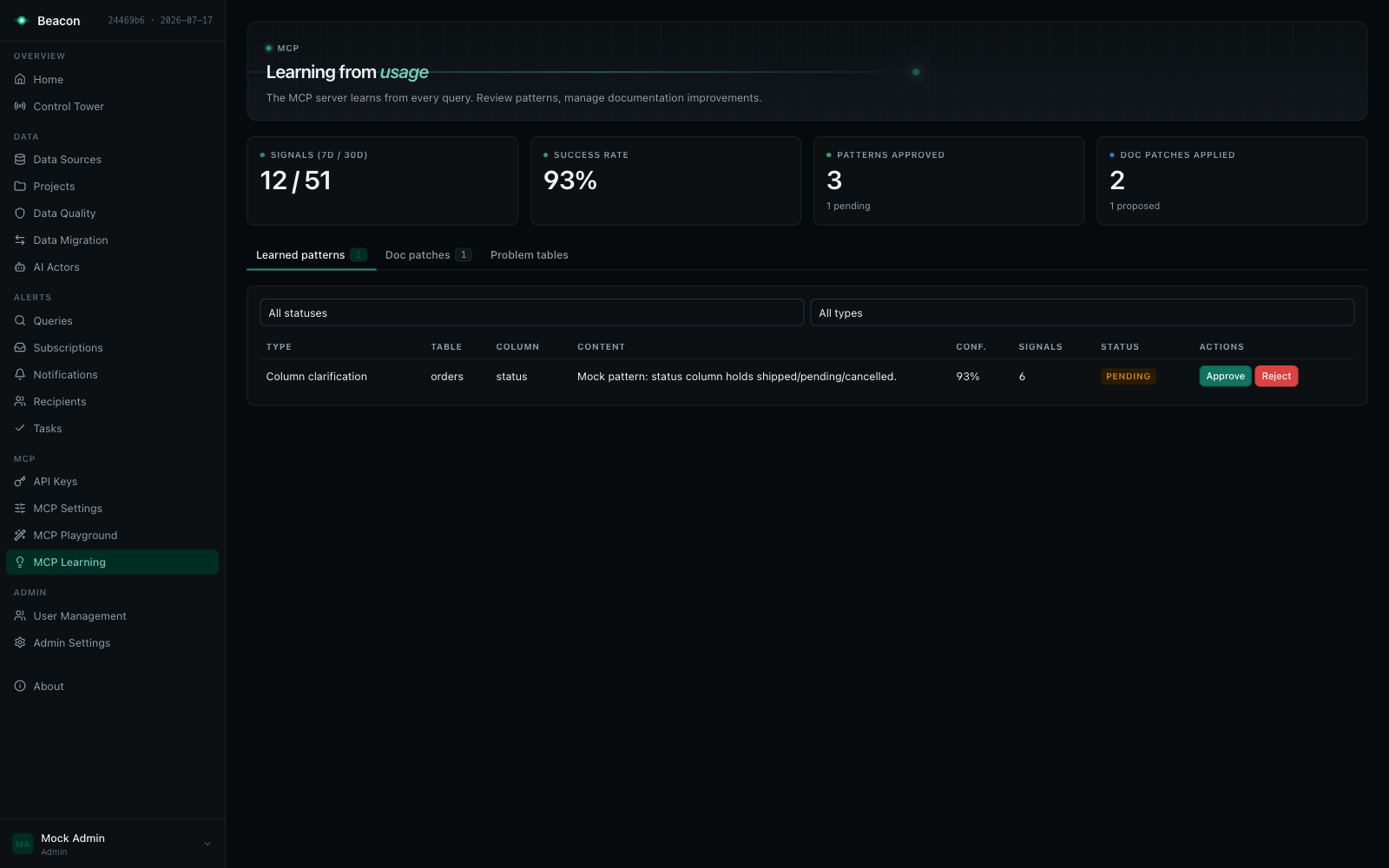
Section titled “The learning loop”Every ask, query, and dry_run call records a usage signal holding the question, the generated SQL, the tables and columns referenced, the routing decision, the outcome and timings. A recurring job turns those signals into reusable knowledge.
From signal to injected lesson
Section titled “From signal to injected lesson”- Mining. Signals are clustered per project and data source. Only
askandquerysignals are mined:dry_runrows carry SQL rather than a natural-language question and are excluded so they cannot skew NL pattern mining or documentation-gap error rates. They remain in the signals table for analytics. A pattern’s example question comes only from anasksignal (aquerysignal’s “question” is the SQL it ran), on one line, and is left out when it holds characters a reviewer cannot see. Verdicts weigh in as follows: anincorrectverdict keeps the answer out of the common-query and join patterns; acorrectverdict makes the answer the preferred example of its pattern and raises the pattern’s confidence only when a curator recorded it. Where a verdict came from is recorded apart from who it is attributed to: the signal keeps the rating user (FeedbackByUserId) and, separately, whether the verdict came from a curator (FeedbackFromCurator), true only when an interactive session holding Curate in the signal’s project at that moment recorded it (a project admin member or an Admin, signed in). A verdict from an API key or an MCP caller is attributed to the user it acts for and never weighs as a curator’s, whatever that user’s roles; neither does an Editor’s or the asker’s own, nor a verdict recorded before Beacon recorded its provenance. Mining reads the recorded provenance, not the rater’s current roles. - Lesson extraction. For each failure-then-correction cluster, an LLM is asked to diagnose the failure and emit one compact, durable lesson. Only the cluster’s text fields are sent, never result rows. If the provider is unavailable or the response does not parse, a deterministic regex + column-similarity path produces the lesson instead, so the loop never silently stops.
- Classification. Lessons become learned patterns of type
SchemaCorrection,ColumnClarification,JoinPattern,CommonQuery,BusinessTermMapping, orDocumentationGap. - Review. A new pattern lands as
NeedsEvidence; confidence alone never approves anything. On the MCP Learning page (/beacon/mcp-learning) a curator of the pattern’s project approves, rejects or sets it back to pending. These are the only statuses a person sets (PUT /beacon/api/mcp/learned-patterns/{id}/statusanswers400for any other;AutoApprovedandNeedsEvidenceare the job’s). A decision applies to the content the reviewer saw: the list hands out each pattern’scontentHash(the SHA-256 of its content, example question and example SQL), the status change sends it back asreviewedContentHash, and a pattern whose content changed since (also when the job refreshes it between the decision’s read and its write) is not decided (409: reload the patterns and review it again). The same digest is stored with the pattern and written with every change to its content, and the decision’s conditional write compares the stored digest. Fixed-length lowercase hex compares exactly under any database collation, where text equality on a case-insensitive SQL Server would let a concurrent case-only or trailing-space change pass. A pattern stored before Beacon kept the digest gets it on its first decision or auto-approval, stored only while the pattern holds no digest and the content read. The reviewer recorded is the caller (403for a caller without a Beacon user). The page shows each pattern in full with who reviewed it (Unknown reviewer for a review time without a recorded reviewer) and which examples a prompt leaves out; anyone else sees the reason instead of the actions. A pattern’s example SQL passes the grounding SQL check when it is mined (SQL that fails is not stored: a new pattern gets none, an existing one keeps its example, and the run logs how many) and again when a person approves the pattern: approval stores it without comments, or is refused with the reason (400). Approving a pattern without example SQL checks nothing. - Replay verification. Auto-approval is decided by replay alone. With
EnableReplayVerificationon (the default), aNeedsEvidencecandidate is replayed: Beacon re-runs the project’s relevant golden cases with and without the candidate injected and auto-approves it only if it flips at leastLearningReplayMinFlips(default 1) case from fail to pass with no regression. Replay is scoped to the candidate’s own project and data source. Before it, the candidate’s example SQL passes the grounding SQL check again and is replayed without its comments; a candidate whose SQL fails is not replayed and staysNeedsEvidence, and the run logs how many. The auto-approval is written only while the candidate is stillNeedsEvidenceand still holds the content the replay measured, compared by its stored digest as a person’s decision is. With replay off, nothing is auto-approved: candidates wait for a person. - Injection. Approved and auto-approved patterns are ranked and injected into Learned Patterns (from usage) under
LearningInjectionBudgetChars(default 1500), filtered to the caller’s authorised project. Example SQL is rendered without its comments, read in the pattern’s data source’s dialect, and the example question on one line; an example that cannot be shown that way is left out and the pattern’s content kept.
Approval binds to the reviewed content
Section titled “Approval binds to the reviewed content”The aggregation refresh never rewrites the content, example question or example SQL of a pattern a person approved or rejected. Only its signal count and confidence refresh, so what was reviewed is what is injected. An auto-approved pattern whose content changes goes back to NeedsEvidence and is replayed again; the run logs how many went back. Content is compared exactly but for the statistics the job writes into its own sentences (the count of a CommonQuery (”… (12 similar queries)”) or a JoinPattern (”… (8 queries)”), the error rate and query count of a DocumentationGap (”… a 40% error rate across 40 queries”)), which the pattern’s signal count and confidence also hold; any other content, a lesson’s numbers included, is compared as written. The question is compared on one line, and the example SQL exactly but for its comments and the whitespace between its tokens, read by the data source’s dialect: a string literal, a quoted identifier, a number and an identifier’s case compare as written. So a count that moves, or SQL stored with comments before they were removed, is no change: the stored count refreshes and the pattern stays auto-approved, while a changed number in a lesson, a changed literal or an identifier in another case sends it back for replay. Every write the job makes to an existing pattern is conditional on the status it read, so a person’s decision between the job’s read and its write is never overwritten.
Documentation patches
Section titled “Documentation patches”Approved schema corrections and documentation gaps also propose documentation patches: a new column or table description (a patch can also target a section of the project’s documentation). Applying or rejecting one is curation: a section patch needs Curate in its project; a description patch changes the data source’s shared metadata, so it needs Curate in every live project linking the source, or a DataSourceAdmin (see Who curates grounding). This is deliberate: a description patch is mined from one project’s signals, but the description it writes is what every project linking the source sees, so a project admin of the mining project alone does not apply it. The Doc patches tab shows each patch’s current and proposed content in full and who applied or rejected it.
A schema correction points at a specific column. When a schema refresh shows that column no longer exists, the correction is marked superseded and is never injected again. The row is kept for audit rather than deleted.
Retention
Section titled “Retention”Signals older than LearningSignalRetentionDays (default 90) are removed by the nightly cleanup job.
Semantic retrieval
Section titled “Semantic retrieval”Keyword matching alone misses the question that says “revenue” when the column is called net_amount. Beacon adds a dense retrieval arm and fuses the two.
Local embeddings
Section titled “Local embeddings”Embeddings are produced in-process by a local ONNX model: a 384-dimension bge-small-en-v1.5 with a WordPiece tokenizer and 512-token inputs. There is no network egress and no third-party embedding API. The model and tokenizer are local files you supply; embeddings are disabled by default so an install without a model keeps working on the lexical path.
{ "Beacon": { "Embeddings": { "Enabled": true, "ModelPath": "/opt/beacon/models/bge-small-en-v1.5.onnx", "TokenizerPath": "/opt/beacon/models/vocab.txt" } }}On PostgreSQL, vectors are additionally written to a pgvector column with an HNSW cosine index so nearest-neighbour search runs in the database. This requires the pgvector extension to be available on the server, since the migration that adds the column runs CREATE EXTENSION IF NOT EXISTS vector. On SQL Server the same vectors are compared in memory from their byte representation, with no extension required. Semantic retrieval works on both; PostgreSQL is just faster at it.
Fusion
Section titled “Fusion”Where a dense arm is available, its ranked results are merged with the keyword results using reciprocal rank fusion, with deterministic tie-breaks so paging stays stable. This drives:
- The
searchMCP tool across tables, columns, and documentation. - Exemplar selection for golden examples and learned patterns (
ExemplarTopK, default 4). - Documentation chunk retrieval (
DocChunkTopK, default 6).
Every dense path fails open: with no embedder configured, or with rows not yet indexed, retrieval falls back to the keyword/overlap path and returns results rather than failing.
Documentation chunking
Section titled “Documentation chunking”Generated project documentation is split into overlapping sentence windows (DocChunkWindowSentences, default 5; DocChunkOverlapSentences, default 1) and embedded so a question can retrieve the paragraph that answers it rather than a whole document. With EnableContextualRetrieval enabled, each chunk is additionally given a short LLM-written blurb situating it in its parent document before embedding, which gives more accurate retrieval at the cost of one LLM call per chunk at index time.
Fusion for documentation is at section granularity: two chunks of the same section collapse into one result.
Background jobs
Section titled “Background jobs”Indexing and aggregation run as recurring Warp jobs in the host, visible on the /warp dashboard:
| Job | Schedule | What it does |
|---|---|---|
mcp-learning-aggregate | Every 6 hours | Mines signals into learned patterns, runs decay and replay verification |
mcp-learning-cleanup | Daily at 03:00 | Removes signals past the retention window |
mcp-embedding-reindex | Every 12 hours | Re-embeds schema metadata and exemplars |
mcp-docchunk-reindex | Every 12 hours | Re-chunks and re-embeds project documentation |
mcp-audit-retention | Daily at 03:30 | Purges MCP audit rows older than Beacon:Mcp:Audit:RetentionDays (a no-op while it is unset); see MCP observability |
These are the sample host’s registrations (Beacon.SampleProject/Program.cs); a host that embeds Beacon schedules them itself.
Settings reference
Section titled “Settings reference”These are the grounding, retrieval and learning settings of McpSettingsData; they round-trip through GET/PUT /beacon/api/mcp/settings. The guardrail settings (max row limit, read-only enforcement, PII detection and patterns, content retention) are described in MCP Server → Configuration. The MCP Settings page (/beacon/mcp-settings) shows sample-value collection and value grounding (globally and per project) and the learning switch, auto-approve threshold, injection budget and signal retention. Everything else in this table is set through the API only; a save on the page sends every setting back as it read it, so the API-only ones keep their values.
| Setting | Default | Effect |
|---|---|---|
EnableSampleValueCollection | false | Collect real sample values for the M-Schema block (and discover column values for documentation) |
EnableValueGrounding | false | Probe live values for the literal-looking words of a question and add the matches to the context |
ValueGroundingMaxProbes | 12 | Most value probes per question; on a shared data source the lowest value among the linking projects wins |
EnableLearning | true | Master switch for signal mining |
LearningAutoApproveThreshold | 0.7 | Stored with the settings; promotion is decided by replay verification (EnableReplayVerification, LearningReplayMinFlips) |
LearningInjectionBudgetChars | 1500 | Character budget for the learned-patterns block |
LearningSignalRetentionDays | 90 | Signal retention window |
EnableReplayVerification | true | Auto-approve a NeedsEvidence candidate only when golden-case replay shows it helps; off, nothing is auto-approved |
LearningReplayMinFlips | 1 | Fail→pass flips a candidate must produce to be promoted |
EnableSemanticRetrieval | true | Use the dense arm when an embedder is available |
ExemplarTopK | 4 | Exemplars selected per question |
EnableGoldenExemplars | true | Inject human-verified examples |
GoldenExemplarTopK | 4 | Golden cases injected |
GoldenExemplarBudgetChars | 2000 | Character budget for the golden-examples block |
GlossaryTopK | 5 | Glossary terms injected |
EnableContextualRetrieval | false | LLM-written situating blurb per doc chunk at index time |
DocChunkWindowSentences | 5 | Sentences per documentation chunk |
DocChunkOverlapSentences | 1 | Sentence overlap between chunks |
DocChunkTopK | 6 | Documentation chunks retrieved |
EnableSelfConsistency | false | Generate several SQL candidates and vote |
SelfConsistencyCandidateCount | 5 | Candidates generated when voting is on |
SelfConsistencyMinTables | 2 | Voting runs only for questions whose context spans at least this many tables |
EnableSemanticLint | true | Deterministic checks on generated SQL in ask (an undeclared join, an aggregate fanning out over a one-to-many join, a non-aggregated column missing from GROUP BY), with one repair attempt from the shared repair budget |
EnableEvalJudge | false | LLM judge adjudicates near-miss eval results |
Project isolation
Section titled “Project isolation”Grounding is retrieval, and retrieval is not authorisation, so every retrieval path is explicitly scoped to the project the caller is authorised for, not to the data source. On a data source shared by several projects, the glossary terms, golden examples, learned patterns, and replay cases one project sees are only ever its own.
The same holds for every grounding call that names a data source, and for every host that calls Beacon’s AI services directly: each takes the caller’s authorized project (projectId) and reads the data source only through it.
- Project material (DataModel documentation, code references from the project’s repositories, glossary terms, golden examples and learned patterns) comes from that project only, never from another project that links the same data source.
- A data source the project does not link is not searched, described or catalogued: the table and column search finds nothing in it, the LLM context, table knowledge, lineage, data source overview and table schemas for it answer “not found”, its schema catalog is empty (so every table in SQL against it fails the schema check), and value grounding probes nothing.
- Live value probes need Query. Value grounding probes the live data only for a caller who may query the project; a caller who may only read it (
get_query_contextas a Viewer) is grounded with the stored sample values alone. - Code references belong to the repository that holds them, and a repository to one project: a scan names its project, and a dbt manifest is imported only into a project that links the data source it describes.
- An eval run needs a project (
400without one).
See Also
Section titled “See Also”- MCP Server: the tools that consume this context, and the guardrails around them
- AI Integration: documentation generation and the LLM provider abstraction
- Data Sources: schema metadata loading
- Admin Settings: LLM provider configuration